Short answer
Cold email reaches the inbox in 2026 when every sending domain has SPF, DKIM and DMARC set up, spam complaints stay below 0.1% and never reach 0.3%, unsubscribing takes one click, and each inbox sends a modest number of emails a day. Send from separate domains, not your main company domain, warm new inboxes for two to four weeks, and add inboxes rather than pushing more mail through one.
On this page
Cold email still works for B2B, but the mailbox providers now enforce rules that used to be advice. A setup that ignores them does not land in spam slowly; it gets rejected. This guide covers the rules, the setup and the numbers to plan around.
Gmail and Yahoo enforce three rules for senders
Since February 1, 2024, Google has required senders of more than 5,000 messages a day to Gmail accounts to meet stricter rules (Google, Email sender guidelines). Yahoo set the same requirements for bulk senders (Yahoo Sender Hub). Cold email teams should treat them as the baseline, whatever their volume.
| Rule | Yahoo | |
|---|---|---|
| Authentication | All senders: SPF or DKIM. Bulk senders: SPF, DKIM and DMARC | SPF and DKIM, plus a passing DMARC policy of at least p=none |
| Spam complaints | Keep below 0.10%, never reach 0.30% | Keep below 0.3% |
| Unsubscribe | One-click unsubscribe for marketing and subscribed mail | One-click unsubscribe, honoured within 2 days |
The spam rate is the one most cold programmes break. It is measured on what recipients report, so the list and the message matter as much as the technical setup.
Send from separate domains and keep each inbox light
Use sending domains that resemble your brand, such as a “.co” or a “get” version of your name, and point them to your main site. Your main domain keeps its reputation for customer and team email.
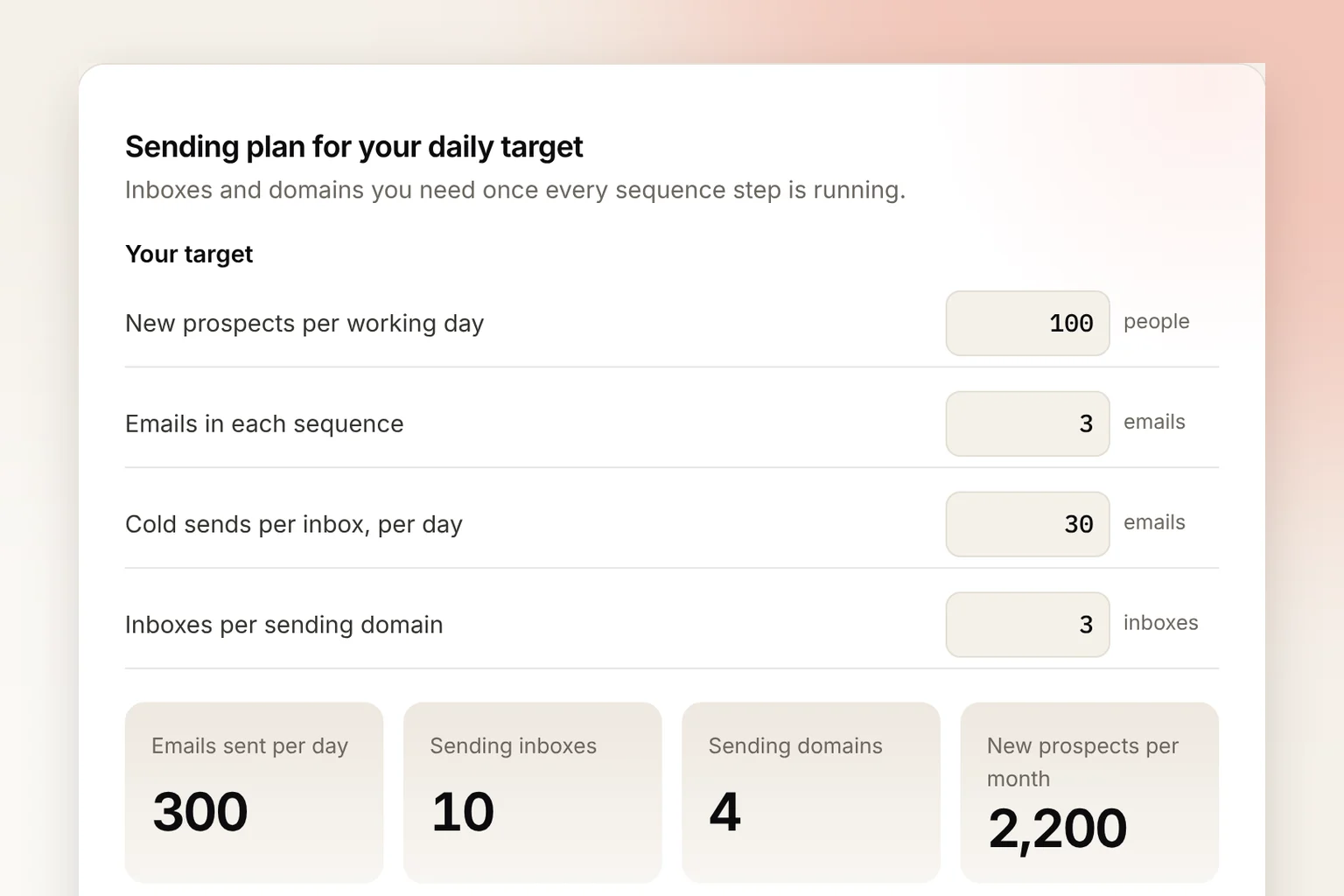
Keep the volume per inbox low. Instantly recommends no more than 30 cold emails per inbox per day, and adding inboxes rather than raising that limit (Instantly). A common setup is three inboxes per sending domain (LeadHaste).
Daily sends = new prospects × emails in the sequence, once follow-ups overlap. Inboxes = daily sends ÷ the per-inbox cap, rounded up. Domains = inboxes ÷ inboxes per domain, rounded up. A month is 22 working days. Keep sending domains separate from your main company domain.
Set up a new sending domain in seven steps
The steps below take about an hour of setup and two to four weeks of warm-up before any cold email goes out.
- Buy a domain close to your brand. A “.co” version or a “get” prefix works. Avoid hyphens and numbers.
- Redirect it to your main website, so anyone who visits the domain sees your real company.
- Create two or three mailboxes with real names, photos and signatures.
- Add SPF and DKIM records for your email provider, then a DMARC record, starting with a monitoring policy.
- Test authentication by sending to a mailbox you control and checking the headers show SPF, DKIM and DMARC passing.
- Start warm-up at a few emails a day and increase slowly for two to four weeks.
- Add the domain to Google Postmaster Tools so you can watch its spam rate once sending starts.
Warm new inboxes for two to four weeks
A new inbox has no reputation. Warm-up builds one by sending and replying to a small, growing number of emails before any cold outreach. Instantly suggests at least two weeks for new inboxes and about four weeks for brand-new domains (Instantly).
Plan the calendar around this. If you want to send in March, buy domains and set up inboxes in early February.
Clean the list before you send
Bounces and complaints come from the list more than the copy. Verify every address before it goes into a sequence, remove role addresses such as info@ and sales@ unless you mean to reach them, and drop anyone who has asked not to be contacted.
Keep sequences short. Three or four emails over two to three weeks is enough. Every extra follow-up raises the chance of a complaint more than the chance of a reply.
Write emails a person would send
Filters read the email as well as the headers. Plain text, one link at most, no attachments on the first email and no tracking pixels where you can avoid them. Write to one person about one reason you are contacting them. The emails that get replies are the same ones that get delivered.
Audit your setup in five minutes
0of 14
- 0–6At risk
Fix authentication and volume first. Pause sending until they pass.
- 7–11Workable
The basics are in place. Close the remaining gaps before scaling.
- 12–14Solid
Scale by adding warmed inboxes, and keep checking spam rate weekly.
Diagnose a drop in replies before you change the copy
When replies fall, the cause is often delivery, not the message. Check delivery first, because rewriting copy will not fix a reputation problem.
| What you see | Likely cause | What to do |
|---|---|---|
| Replies drop across every sequence at once | Domain or inbox reputation | Pause sending, check Postmaster Tools, slow volume and warm again |
| Bounces above a few percent | Unverified or old list | Verify every address and remove bounced contacts |
| Opens fine, replies near zero | Message or targeting | Rewrite the first line and check the list matches your profile |
| One inbox performs far worse than others | That inbox is flagged | Stop sending from it and rest it for two weeks |
| Spam complaints rising | Wrong audience or too many follow-ups | Narrow the list and cut the sequence to three emails |
Keep a weekly deliverability routine
Fifteen minutes a week prevents most problems. Check the spam rate for each domain, the bounce rate for each sequence and the reply rate for each inbox. Rest any inbox that falls behind the others, and keep a few warmed spare inboxes ready, so a flagged one never stops the whole programme.
Sources
- Email sender guidelines · Google
- Sender best practices · Yahoo Sender Hub
- AI SDR email deliverability guide (30 emails per inbox per day) · Instantly
- How many domains do you need for cold email? · LeadHaste
- Benefits of a slow ramp warm-up for cold email domains · Instantly
Questions
How many cold emails can I send per day from one inbox?
Instantly's guidance is no more than 30 cold emails per inbox per day after warm-up, and to add inboxes rather than raise that limit. Treat 30 as a ceiling for new domains.
Should I send cold email from my main company domain?
No. Use separate sending domains that look like your brand. If a sending domain's reputation drops, your main domain and your team's everyday email stay safe.
How long should I warm up a new inbox?
At least two weeks for a new inbox, and about four weeks for a brand-new domain, increasing volume in small steps while bounces and complaints stay low.
What spam complaint rate is safe?
Google asks senders to keep the rate reported in Postmaster Tools below 0.10% and never reach 0.30%. Yahoo requires bulk senders to stay below 0.3%.

Founder of Autoniqo. Runs LinkedIn, outbound and AI search for founder-led B2B teams in the US, UK, EU and the Gulf. 405 projects on Upwork at 100% Job Success.