Short answer
Start with Apollo if you need a contact database and email sequences in one tool at a low per-seat price. Choose Clay when your targeting depends on research Apollo cannot do, such as buying signals, custom data points or combining several data providers. Many outbound teams run both: Clay builds and enriches the list, and a sequencer such as Apollo or Instantly sends.
On this page
Clay and Apollo come up in almost every early outbound build. They overlap less than the comparisons suggest. One is a database you search; the other is a workbench you program. The right choice depends on where your outbound is stuck.
Apollo is a database with outreach built in
Apollo gives you a large B2B contact database, filters to search it, and email sequences to contact the people you find. A founder can go from filters to a running sequence in one afternoon. Plans start with a free tier and move to paid per-seat plans with more credits and features (Apollo pricing).
Its limits show when your targeting goes beyond standard filters. If the reason to contact someone is a hiring post, a funding round or a product launch, you will be doing that research by hand.
Clay is a workbench that combines many data sources
Clay is a spreadsheet-like tool that pulls data from many providers and runs automated research on each row. You can find a company’s recent hires, check its tech stack, write a first line from its latest news and keep the best contact data from several providers. Its pricing in November 2026 (Clay pricing):
| Clay plan | Billed monthly | Billed annually | Included per month |
|---|---|---|---|
| Free | $0 | $0 | 500 actions, 100 data credits |
| Launch | $185 | $167 | 15,000 actions, 3,000 data credits |
| Growth | $495 | $446 | 40,000 actions, 6,000 data credits |
| Enterprise | Custom | Custom | Custom volumes |
Clay rewards someone who will build and maintain workflows, the job of a GTM engineer. Without that person, much of what you pay for goes unused.
Compare where each tool is strong and where it falls short
| Apollo | Clay | |
|---|---|---|
| Best at | Finding contacts fast and sending sequences from one place | Research, enrichment and combining many data sources |
| Learning curve | Low: filters and a sequence editor | Higher: tables, formulas and workflows |
| Data | Its own database | Many providers, including Apollo, chosen per column |
| Sending | Built in | Needs a sequencer or CRM |
| Weak spot | Targeting beyond standard filters | Cost and upkeep without a dedicated builder |
The table points to a simple rule. If your list is standard and your bottleneck is time, Apollo removes it. If your list depends on information that filters cannot capture, Clay is the tool that can find it.
Many teams run both, in this order
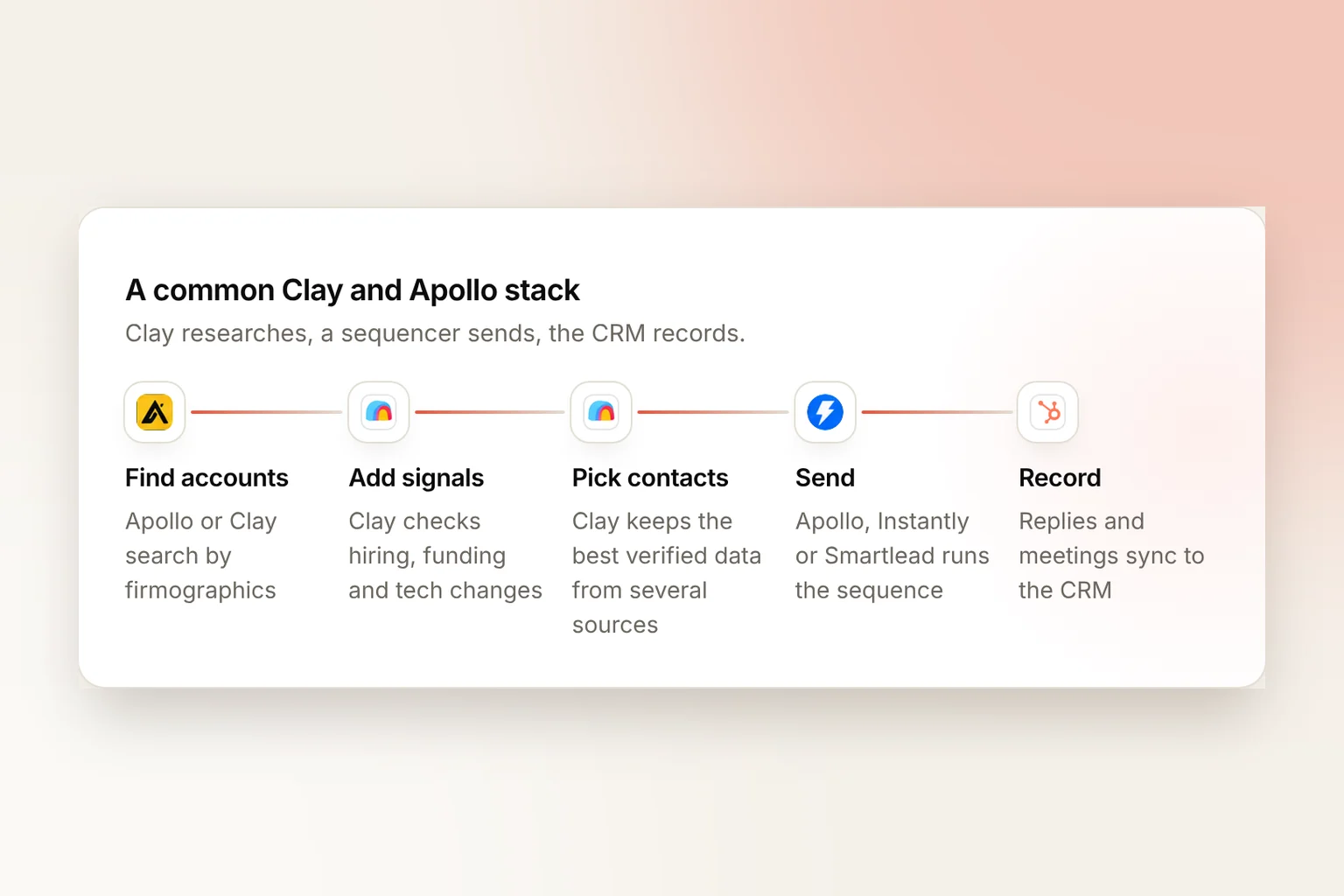
Once targeting depends on signals, the common stack puts Clay in front of a sequencer. Clay decides who to contact and why. The sequencer sends and tracks. The CRM keeps the record.
- Find accounts
Apollo or Clay search by firmographics
- Add signals
Clay checks hiring, funding and tech changes
- Pick contacts
Clay keeps the best verified data from several sources
- Send
Apollo, Instantly or Smartlead runs the sequence
- Record
Replies and meetings sync to the CRM
Choose by where your outbound is stuck
Start with Apollo
You know your target companies and titles, and you need emails and a sequence this week. Apollo does both in one place at a per-seat price.
- Search by industry, size and title
- Verify emails before sending
- Send from separate, warmed domains
Start with Clay, add a sequencer
Your best accounts are the ones showing a signal, such as hiring for a role or raising money. Clay can find those signals and write a first line from them, then hand the list to a sequencer.
- Build one workflow per signal
- Keep the best data from several providers
- Push results into Instantly, Smartlead or Apollo
Run both, with one owner for the stack
With several plays and sellers, use Clay for research and enrichment and a sequencer for sending. The stack needs an owner, often a GTM engineer, to keep data clean and domains healthy.
Budget for the person who maintains the workflows, not only the licences.
Build one Clay workflow before you build ten
A first workflow should answer one question about one list. A good starter is a hiring signal for a single buyer type.
- Import accounts that match your profile from Apollo, a CSV or your CRM.
- Check for the signal, for example an open job post that matches the problem you solve.
- Find the buyer at each account that shows the signal, and verify the email.
- Write a first line from the job post, then review a sample by hand before trusting it.
- Push the rows with a signal into your sequencer, and the rest into a nurture list.
Run it on a few hundred accounts first. Check the reply rate against your usual outreach before you spend more credits.
Avoid the mistakes that waste credits
- Enriching every row. Filter the list first, then enrich only accounts that pass. Credits go on the accounts you will contact.
- Running workflows on autopilot. Data providers change and steps break. Check a sample of rows every week.
- Skipping verification. A cheap unverified email that bounces costs more in domain reputation than the verification would have.
- Building before the message works. Automation sends more of what you already have. Prove the message by hand first.
Check the price against the job, not the plan name
Compare the cost per usable contact, not the monthly fee. Count how many contacts reach a sequence each month, after verification and filtering, and divide the total tool cost by that number. A cheaper tool with poor data can cost more per meeting than an expensive one.
Sources
- Clay pricing · Clay
- Apollo pricing · Apollo
Questions
Is Clay better than Apollo?
They do different jobs. Apollo is a database with outreach built in. Clay is a research and enrichment workbench that pulls from many providers, including Apollo. The better choice depends on whether your bottleneck is contacts or research.
How much does Clay cost?
Clay's published pricing lists a free plan, Launch at $185 a month billed monthly ($167 billed annually) and Growth at $495 a month billed monthly ($446 billed annually), with Enterprise on request.
Can Clay send emails?
Clay is built for finding and enriching data. Most teams push Clay's output into a sequencer such as Instantly, Smartlead, Apollo or their CRM to send.

Founder of Autoniqo. Runs LinkedIn, outbound and AI search for founder-led B2B teams in the US, UK, EU and the Gulf. 405 projects on Upwork at 100% Job Success.